A Professional's Take on the New Katana A15 Ai 2024
The landscape of portable computing is undergoing a seismic shift as the term Artificial Intelligence transitions from a marketing buzzword to a functional hardware requirement. In the midst of this evolution, the MSI Katana A15 Ai 2024 emerges as a pivotal entry in the mid-range gaming and professional workstation segment. While the Katana series has traditionally been positioned as MSI’s entry-to-mid-range offering—balancing performance with cost-effectiveness—the 2024 iteration brings significant architectural updates that merit a closer look from a professional perspective. This article explores how the integration of dedicated AI processing hardware, updated cooling solutions, and the latest silicon from AMD and NVIDIA transforms a legacy budget-friendly chassis into a modern productivity powerhouse.
The Evolution of the Katana Series
For several years, the MSI Katana line served a specific niche: providing the highest possible frame rates per dollar for gamers who were willing to accept a plastic-heavy build and a more conservative display. However, the professional user of 2024 is no longer just a gamer who occasionally checks emails. Today’s professionals are data scientists running local LLMs, video editors utilizing neural filters, and architects rendering complex 3D environments. Recognizing this, the Katana A15 Ai 2024 has been re-engineered to support these specialized workflows. The "Ai" suffix is not merely decorative; it denotes the inclusion of the AMD Ryzen 8000 series processors, which feature a dedicated Neural Processing Unit (NPU) designed to offload background tasks from the CPU and GPU, thereby improving efficiency and battery longevity during specific workloads.
Hardware Architecture and Performance Analysis
At the heart of the Katana A15 Ai 2024 lies the AMD Ryzen 8040 series processor, specifically the Ryzen 7 8845HS in most standard professional configurations. This chip utilizes the Zen 4 architecture, offering eight cores and sixteen threads. From a professional standpoint, the Zen 4 architecture is highly regarded for its IPC (Instructions Per Clock) improvements and energy efficiency compared to previous generations. In multi-threaded applications like Cinema 4D or Adobe Premiere Pro, the 8845HS provides a stable foundation for rendering and encoding without the thermal throttling issues that plagued thinner laptops in this category in previous years.
The graphics department is handled by the NVIDIA GeForce RTX 40-series Laptop GPUs. For the Katana A15 Ai, the sweet spot is often the RTX 4060 or 4070. These GPUs leverage the Ada Lovelace architecture, which is revolutionary for its power efficiency. Professionals benefit specifically from the 4th Generation Tensor Cores, which accelerate AI-driven tools in software like DaVinci Resolve or the Adobe Creative Cloud suite. The inclusion of a MUX switch—a feature once reserved for premium "Titan" or "Raider" series laptops—allows users to bypass the integrated graphics and connect the display directly to the dedicated GPU, maximizing performance for demanding graphical tasks.
Thermal Management: Cooler Boost 5
Thermal management is the Achilles' heel of many mid-range laptops. MSI has addressed this in the 2024 Katana A15 Ai by refining the Cooler Boost 5 system. This setup includes two fans and six heat pipes with a shared-pipe design. For the professional user, this translates to sustained clock speeds during long render sessions. Unlike consumer-grade laptops that might boost high for thirty seconds and then drop significantly, the Katana A15 Ai maintains a more consistent thermal envelope. The bottom of the chassis features a honeycomb-style ventilation pattern that facilitates better intake, though users are still advised to use the laptop on a hard, flat surface to ensure optimal airflow.
Display and Visual Fidelity
The 15.6-inch display on the Katana A15 Ai 2024 represents a step forward, offering a QHD (2560 x 1440) resolution with a 165Hz refresh rate in higher-tier configurations. While gamers care about the refresh rate for smooth motion, professionals should focus on the color accuracy. The 2024 model provides much better color gamut coverage than its predecessors, often reaching 100% sRGB. This makes it a viable tool for web designers and content creators who need to trust that the colors they see on screen will look the same on other devices. However, it is worth noting that for high-end print work or HDR video grading, an external calibrated monitor remains a necessity, as the peak brightness usually hovers around 300 to 350 nits.
Real-World Use Cases for the Modern Professional
To understand the value of the Katana A15 Ai 2024, one must look at how it handles modern software environments. Consider the workflow of a freelance motion designer. In a typical day, they might be running After Effects for composition, Blender for 3D assets, and dozens of browser tabs for research. The Katana’s ability to support up to 64GB of DDR5 memory is a significant advantage here. While many competitors solder their RAM, MSI keeps two SO-DIMM slots accessible, allowing professionals to upgrade their hardware as their workloads grow.
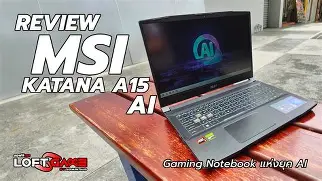
In the realm of AI development, the onboard NPU (XDNA architecture) is a quiet hero. While the RTX GPU handles the heavy lifting of training or intensive inference, the NPU can handle Windows Studio Effects—such as eye contact correction, background blur, and noise cancellation during video calls—without touching the GPU's resources. This ensures that a Zoom call doesn't slow down a background render. As more software developers optimize for the Ryzen AI engine, the utility of this laptop will only increase over its lifecycle.
Looking for the best Electronics deals on Amazon?
See Deals →Detailed Specification Comparison
To better understand where the Katana A15 Ai 2024 sits in the current market, it is helpful to compare it against common alternatives found in professional environments.
| Feature | Katana A15 Ai (2024) | Typical Mid-Range Competitor | Premium Ultrabook |
|---|---|---|---|
| Processor | AMD Ryzen 7 8845HS (with NPU) | Intel Core i7-13650HX | Intel Core Ultra 7 155H |
| GPU | RTX 4060/4070 (Up to 105W TGP) | RTX 4050/4060 (Varying TGP) | RTX 4050 (Low TGP) or Integrated |
| RAM | 2x DDR5 SO-DIMM (User Upgradable) | Mixed (Often one slot soldered) | Soldered LPDDR5x |
| Storage | 2x M.2 PCIe Gen4 Slots | 1x or 2x M.2 Slots | 1x M.2 Slot |
| Keyboard | 4-Zone RGB with NumPad | Single Color Backlit | White Backlit (No NumPad) |
| Chassis | Reinforced Plastic / Polycarbonate | Plastic / Aluminum Mix | Full CNC Aluminum |
Pros and Cons of the Katana A15 Ai 2024
Every piece of hardware involves trade-offs. The Katana A15 Ai 2024 is no exception, and understanding these is key to making an informed professional purchase.
- Pro: Exceptional Price-to-Performance Ratio. You are getting top-tier Ryzen 8000 and RTX 40-series hardware without the "luxury tax" associated with premium metal builds.
- Pro: Dedicated AI Hardware. The Ryzen AI engine future-proofs the machine for the upcoming wave of AI-integrated OS features and applications.
- Pro: Thermal Stability. The Cooler Boost 5 system is louder but more effective than many competitors, ensuring long-term hardware health.
- Pro: Upgradeability. Having two populated RAM slots and two M.2 slots is increasingly rare in 2024, providing a clear path for professional growth.
- Pro: Keyboard Experience. The 1.7mm key travel is excellent for long-form writing and coding, and the full-sized number pad is essential for data entry and CAD work.
- Con: Battery Life. Despite the efficiency of the Ryzen chip, the high-performance GPU and 165Hz screen mean that you will need to carry the power brick for full-day professional use.
- Con: Build Materials. The polycarbonate chassis is sturdy but lacks the premium feel of an aluminum device, often showing fingerprints more easily.
- Con: Port Placement. Most ports are on the sides; some professionals prefer rear-mounted ports for a cleaner desk setup when using multiple peripherals.
- Con: Webcam Quality. While functional for basic meetings, the 720p resolution is lagging behind the 1080p sensors starting to appear in other professional-grade units.
Professional Buying Guide: Is the Katana A15 Ai Right for You?
When selecting a laptop for a professional environment, the "best" choice depends entirely on the specific demands of your software and your mobility needs. The Katana A15 Ai 2024 occupies a unique middle ground that makes it ideal for some and overkill for others.
Recommended for: Creative Professionals and Engineers
If your daily work involves rendering 4K video, 3D modeling in SolidWorks or Blender, or compiling large codebases, the Katana A15 Ai 2024 is a strong contender. The combination of high TGP (Total Graphics Power) and the expandable RAM makes it a "workhorse" rather than a "showpiece." For those moving between an office and a home studio, the weight (approximately 2.25kg) is manageable, and the performance rivals many desktop setups from just two years ago.
Recommended for: Data Scientists and AI Researchers
The "Ai" branding is relevant here. While you won't be training massive foundational models locally, this laptop is perfect for developing and testing local AI agents, running quantized versions of Llama 3 for private data processing, and exploring the capabilities of NVIDIA's TensorRT. The 8GB of VRAM found in the RTX 4060/4070 models provides enough overhead for most local prototyping tasks.
Considerations for: Enterprise and Corporate Users
For users who spend most of their time in Excel, PowerPoint, and web-based SaaS tools, the Katana might be more than necessary. The design, while significantly more understated than previous "gaming" generations, still features RGB lighting (which can be set to static white) and a slightly aggressive aesthetic. If you require a laptop for client-facing meetings in a traditional corporate setting, you may need to weigh the raw power of the Katana against the more conservative appearance of a business-first ultrabook.
Ergonomics and Daily Workflow
Beyond the internal specs, the day-to-day usability of the Katana A15 Ai 2024 is where it earns its keep. The keyboard features MSI’s signature translucent WASD keys, which might feel a bit "gamer" for some offices, but the actual typing feel is superior to many shallow chiclet keyboards. The keystrokes are quiet enough for a shared office space, and the spacing prevents accidental double-strikes. The touchpad is responsive and supports Windows Precision drivers, making multi-finger gestures for switching desktops a breeze.
Discover deals on Electronics — updated daily.
Browse Now →Connectivity is another area where professionals will find value. The Katana includes a dedicated RJ45 Ethernet port, which is crucial for stable, high-speed file transfers that Wi-Fi 6E—though supported—can’t always match in congested office buildings. The USB-C port supports DisplayPort output, allowing for a seamless dual-monitor setup when paired with the HDMI 2.1 port. However, it is important to note the lack of Thunderbolt support; since this is an AMD-based system, you rely on high-speed USB 3.2 Gen 2 rather than the Thunderbolt 4 standard found on Intel machines. For most workflows, this is a distinction without a difference, but for those using specialized Thunderbolt-only RAID arrays or external GPUs, it is a critical detail.
Software Integration: MSI Center and AI Engine
MSI includes the MSI Center software, which has matured significantly. The new "AI Engine" feature can automatically detect the software you are currently using and adjust system settings accordingly. For example, when you launch Adobe Premiere Pro, the system can automatically switch to "Extreme Performance" mode and prioritize the GPU. When you switch to a browser or Word, it can shift to "Silent" mode to save power and reduce fan noise. From a professional perspective, this automation is welcome as it allows you to focus on your work rather than micromanaging your hardware configurations.
Furthermore, the Ryzen AI software stack is becoming increasingly important. Developers are now able to leverage the NPU for tasks like noise cancellation, background removal in video, and even certain types of predictive text parsing. While we are still in the early days of NPU utilization on Windows, having the hardware on board today ensures that the Katana A15 Ai will remain relevant as Windows 11 (and beyond) integrates more AI-first features into the core operating system experience.
Conclusion
The MSI Katana A15 Ai 2024 represents a thoughtful evolution of a classic design. It successfully bridges the gap between a high-performance gaming machine and a reliable professional workstation by focusing on what truly matters: thermal stability, hardware versatility, and the integration of forward-looking AI processing technologies. While it retains some of the aesthetic markers of its gaming heritage, its performance in professional creative and technical applications is undeniable.
For the professional who needs a "do-it-all" machine that can handle complex renders by day and intensive processing tasks by night—all without breaking the bank—the Katana A15 Ai 2024 is a compelling choice. It reminds us that "professional" equipment doesn't always have to be wrapped in expensive aluminum or carry a boutique price tag; sometimes, it just needs to have the right architecture, efficient cooling, and the power to get the job done. As AI continues to redefine our digital tools, having a machine that is purpose-built to navigate this new era is not just a luxury, but a strategic advantage for any modern professional.